

Ever wondered what it would take to improve a CI/CD process yourself? In my last project, I was often reminding my team members to format their otherwise excellent code. This was especially frustrating considering we all were required to use a formatter and told how to incorporate the formatter into our IDEs. The project is now over but it bugged me to the point of me solving the problem on my own.

The Problems Caused by Standardizing Code Style
Why Code Style Exists
This problem mostly exists in free form languages like Java and other C language derivatives. Java requires a ‘;’ to be at the end of a statement. This can be anywhere in a code file. The below is an example
package java.test;

public class SampleApp { public static void Main(String[] args) {System.out.println("out");}}
This small class will compile and run. While this small class might be easy to parse with your eyes now. Imagine the actual headaches caused if the last line was a few thousand characters long. I cannot emphasize how much good code formatting matters. I spent three weeks on a small perl script until I had reformatted it. After the reformatting, it took me two hours to fix the bug and submit for release. Do not ask me why I didn’t reformat it at the start. That perl script taught me to always format code into something sane.
The Team Issue
Everyone will have an opinion on what a “proper” code formatting should look like. Most code formatting styles are based on a coder’s experience. The easy way to solve the opinion problem is to standardize the code style. This means that all the code “looks” the same no matter the coder. This allows for an easier time reading the code and debugging the code. This solution leads to another issue, however.
The Enforcement/PR Issue
I have found that a standard is only as good as it can be enforced. Most team issues can be solved via team discipline. However, not all humans are as discipled as others. Even those in the military can stray from habits drilled into them. To aid in the speed of code style conformity, open source formatters have been created. For example, IntelliJ has a configuration option to format Java code to conform to the Google Java Standard.
However, even when it takes less than a second to reformat code, it may still require a team member to remind other members to “fix the code.” Otherwise perfect code can be rejected in a peer review because of forgetfulness. This is unacceptable to me because I would rather have talented developers solving the next problem, not formatting code because they are having a bad day at work. The question should be “Can we automate formatting code in the pipeline?”

The Answer is Yes
I work with an open source formatter named Black while working on Python projects. I have my IDE run it every time a file is saved. In a team environment, I would like to have this formatting part of the CI/CD pipeline. In a Java project, this normally means a Maven or Gradle integration. In my experience, most CI/CD tools integrate well with Maven or Gradle. GitHub Actions and Jenkins both have Maven support.

My Solution: Creating a New Maven Plugin
Maven plugins can be deployed easily and are inobtrusive to workflow at the workstation or in a pipeline.
Research
I knew that the problem of formatting Java code into Google Java Format had be solved because I already saw it in action so I started looking for that solution. This lead me to https://github.com/google/google-java-format and while reading the README file, I found several third party integrations that would be perfect for a team environment. In a project, the next steps would be to integrate one of those solutions into the pipeline. I didn’t stop there in this case because writing a mojo is the project.
Finding A Starting Point
There is no need to “recreate the wheel” if I already have a good place to start. I do know that my maven plugin example is a good place to start so I will copy that over and it will get me 60-70% of the way to where I want to be in terms of code and project structure.
Update All the Dependencies
This is the process of upgrading all of the libraries that the starting point uses and make sure it all still runs. I am starting from a place of working code so any issues at this point is from my upgrading. It turns out that not much was needed here. However, as I was testing the integration test code, I found a few bugs in the test code and fixed those issues. I will need to circle back on the original repo and fix it in the future.
Adding Changes
Now that I know I have a working set of tests and code, it is time to start breaking it. I start by adding the needed libraries that I knew to be needed to the pom file.
    <dependency>
      <groupId>com.google.googlejavaformat</groupId>
      <artifactId>google-java-format</artifactId>
      <version>${google-java-format.version}</version>
    </dependency>
This would be followed by changing the mojo. Big decisions need to be made here. The following code is a result of those decisions.
@Mojo(name = "format",
    defaultPhase = LifecyclePhase.PROCESS_SOURCES,
    requiresOnline = false, requiresProject = true,
    threadSafe = false)
public class GoogleCodeFormatterMojo extends AbstractMojo {

  @Parameter(property = "srcBaseDir", defaultValue = "${project.build.sourceDirectory}")
  protected File srcBaseDir;
The first decision is when to run this plugin. I decided to have it run before any compilation is done (PROCESS_SOURCES). For more context on when this phase is run, please refer to my earlier post on Maven plugins. This will make sure that all code changed will be compiled and unit tested in the same run. Any issues caused by the reformatting will be caught well before it leaves the local environment. The chances of the formatter messing up the code are low but possible. The second big decision was where the plugin would do the changes. While most changes should end up in the target directory, I broke that rule and decided to search and change code in the src directory. I also assumed that I this plugin would work with Java code only. Considering I am working on incorporating a Java code formatter, I felt this was a good assumption.
How I Fixed my Biggest Issue in the Project
The main issue I had running my code was the formatter library’s dependence on internal classes in the JDK. This becomes an issue at Java 16 and higher. Since I am running at Java 22, it became an issue. The issue will present itself below. For those who do not want to read a stack trace, the part to look for is “cannot access class com.sun.tools.javac.parser.Tokens$TokenKind (in module jdk.compiler) because module jdk.compiler does not export com.sun.tools.javac.parser to unnamed module.”
    at org.apache.maven.plugin.DefaultBuildPluginManager.executeMojo (DefaultBuildPluginManager.java:165)
    at org.apache.maven.lifecycle.internal.MojoExecutor.doExecute2 (MojoExecutor.java:328)
    at org.apache.maven.lifecycle.internal.MojoExecutor.doExecute (MojoExecutor.java:316)
    at org.apache.maven.lifecycle.internal.MojoExecutor.execute (MojoExecutor.java:212)
    at org.apache.maven.lifecycle.internal.MojoExecutor.execute (MojoExecutor.java:174)
    at org.apache.maven.lifecycle.internal.MojoExecutor.access$000 (MojoExecutor.java:75)
    at org.apache.maven.lifecycle.internal.MojoExecutor$1.run (MojoExecutor.java:162)
    at org.apache.maven.plugin.DefaultMojosExecutionStrategy.execute (DefaultMojosExecutionStrategy.java:39)
    at org.apache.maven.lifecycle.internal.MojoExecutor.execute (MojoExecutor.java:159)
    at org.apache.maven.lifecycle.internal.LifecycleModuleBuilder.buildProject (LifecycleModuleBuilder.java:105)
    at org.apache.maven.lifecycle.internal.LifecycleModuleBuilder.buildProject (LifecycleModuleBuilder.java:73)
    at org.apache.maven.lifecycle.internal.builder.singlethreaded.SingleThreadedBuilder.build (SingleThreadedBuilder.java:53)
    at org.apache.maven.lifecycle.internal.LifecycleStarter.execute (LifecycleStarter.java:118)
    at org.apache.maven.DefaultMaven.doExecute (DefaultMaven.java:261)
    at org.apache.maven.DefaultMaven.doExecute (DefaultMaven.java:173)
    at org.apache.maven.DefaultMaven.execute (DefaultMaven.java:101)
    at org.apache.maven.cli.MavenCli.execute (MavenCli.java:906)
    at org.apache.maven.cli.MavenCli.doMain (MavenCli.java:283)
    at org.apache.maven.cli.MavenCli.main (MavenCli.java:206)
    at jdk.internal.reflect.DirectMethodHandleAccessor.invoke (DirectMethodHandleAccessor.java:103)
    at java.lang.reflect.Method.invoke (Method.java:580)
    at org.codehaus.plexus.classworlds.launcher.Launcher.launchEnhanced (Launcher.java:255)
    at org.codehaus.plexus.classworlds.launcher.Launcher.launch (Launcher.java:201)
    at org.codehaus.plexus.classworlds.launcher.Launcher.mainWithExitCode (Launcher.java:361)
    at org.codehaus.plexus.classworlds.launcher.Launcher.main (Launcher.java:314)
Caused by: org.apache.maven.plugin.PluginContainerException: An API incompatibility was encountered while executing com.darylmathison:code-formatter-maven-plugin:1.0-SNAPSHOT:format: java.lang.IllegalAccessError: class com.google.googlejavaformat.java.JavaInput (in unnamed module @0x46cb98a3) cannot access class com.sun.tools.javac.parser.Tokens$TokenKind (in module jdk.compiler) because module jdk.compiler does not export com.sun.tools.javac.parser to unnamed module @0x46cb98a3
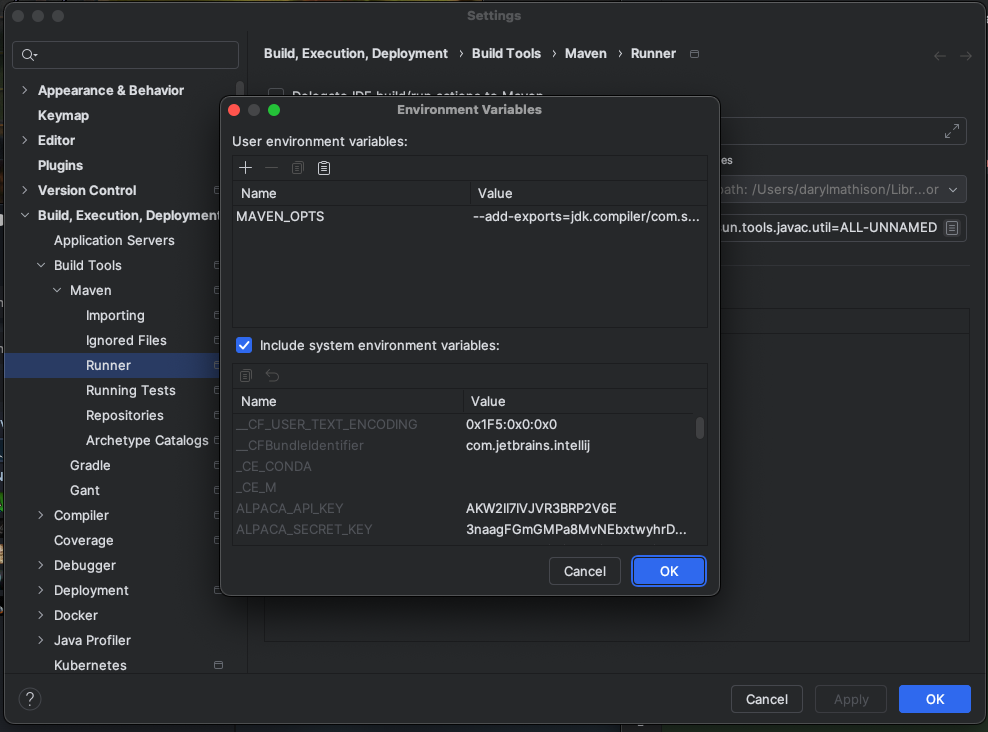
The solution to the problem is found in the google-java-format Readme file. A number of runtime engine overrides need to be added. IntelliJ made my life more “fun” as the newest Maven has a jdk.conf file to set these overrides I but IntelliJ’s Maven Plugin does not read that file. After some poking around, I put the settings into the MAVEN_OPTS environment variable like I have below.
Unit Test Challenges
Each test involved a new pom file to keep the exercise the code I wanted to exercise. It is less of a complaint and more of an observation. My main challenge was the clean up issue.
The Cleanup Issue
Every good unit test needs to tear down or reverse any changes to the environment so the next test starts independently from the last test. To make sure the plugin worked as designed, I wanted the src/test directory to be changed and not anything in the target directory. The easiest way to reset source code is to revert the changes in git. It was easy enough to do by incorporating jgit and have it revert the src/test/resource directory. I have included the pom file changes and cleanup code below.
    <dependency>
      <groupId>org.eclipse.jgit</groupId>
      <artifactId>org.eclipse.jgit</artifactId>
      <version>7.2.0.202503040940-r</version>
      <scope>test</scope>
    </dependency>
  @Override
  protected void tearDown() throws Exception {
    cleanupPath(baseTestDirectory);
    super.tearDown();
  }

  private void cleanupPath(String path) throws IOException, GitAPIException {
    File basedir = new File(getBasedir());
    try(Git git = Git.open(basedir)) {
      git.checkout().addPath(path).call();
    }
  }
The code is simple and works well as it reverts any changes contained in path. The path is hard coded in a static final String to be the root directory of all the unit test resources. This is where the test poms and candidate code to be reformatted are kept. Any time I was debugging the tests, it would work once and then not work because any uncommitted changes were being removed by the cleanup code. I adjusted by committing my changes before testing them and things worked out better. This is clunky but it made sure that the code modifying the source code was actually modifying source code.
Implementing Integration Tests
I decided to put integration tests on a profile called run-its because integration tests can be environment dependent and I do not want to become a slave to an environment while working with unit tests. That being taken care of I started to change the tests to reflect the functionality of the mojo. While debugging the tests, I was having issues finding out what was happening inside of the integration environment.
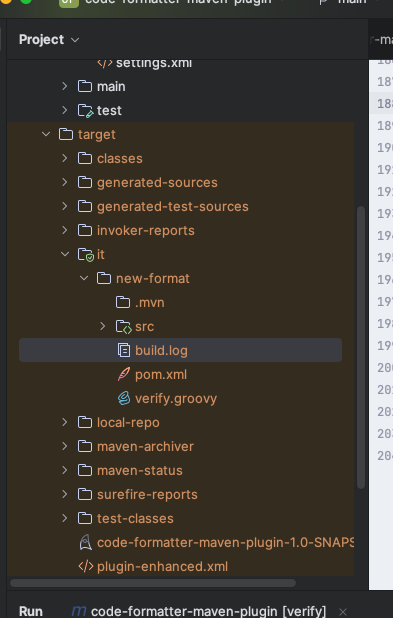
It turns out that Maven has a build in solution. In the target/it directory, Maven keeps track of each integration test. Each test has its own build.log file and this is where one can gain insight into what is happening inside of the integration test. My level of frustration calmed down considerably after this discovery. For those visual learners, here is a screenshot of the directory path described.
The completed code can be found at https://github.com/darylmathison/code-formatter-maven-plugin
Next Steps with the Plugin
I could argue that this plugin is not done as a developer needs to remember to commit any formatted/changed files. The plugin also assumes that all source files need to be formatted whether or not they were changed. This would be an excellent use of the jgit library that I incorporated into the unit tests.
Is there anything else that needs to be added? One can add to the comments below or If one wants to get their hands dirty, create a PR from a fork and I will consider adding your changes. Any changes merged will be discussed in a post with a shout out to the author.
In Conclusion
While automated code formatting was discussed, it was to be the backdrop for a practical use of Maven Plugins(Mojos). I found a ready made formatter google-code-format found in GitHub and incorporated it into a Maven Plugin framework.
References
Please Support My Work
If you have found some value in reading this and wish to support me in some way. I have the following list.
- Like
- Comment
- Subscribe
- Click here to contribute.


 Daryl's Blog